

USB Flash Drive vs Portable SSD: Which Offers Better Value, Price and Longevity?
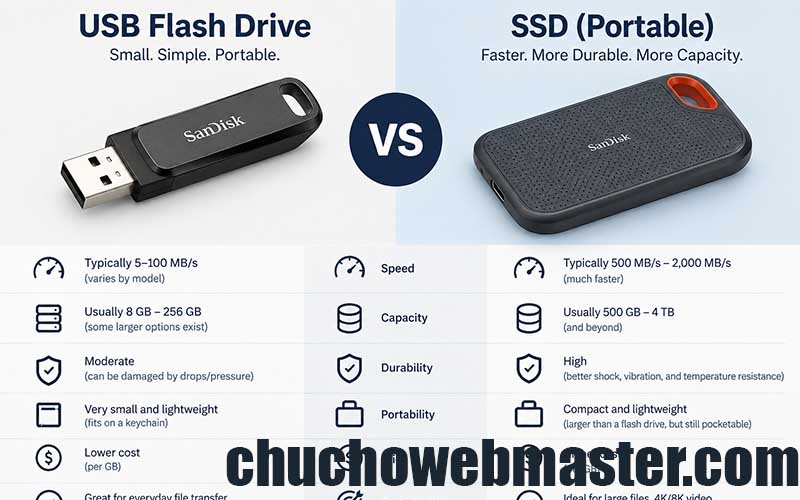
USB flash drives and portable solid-state drives (SSDs) are both convenient ways to store and transfer digital files. They use flash memory, have no moving parts, and are available in compact designs that fit easily into a pocket or bag. However, despite these similarities, they differ considerably in performance, cost, durability, and suitability for long-term storage.
Choosing between them depends on how much data you need to store, how frequently you access it, and how important it is to preserve your files over time. While a traditional USB flash drive may be sufficient for everyday tasks, a portable SSD is often a better investment for demanding workloads and larger data collections.
1. Price and Cost per Gigabyte
Price is one of the most noticeable differences between USB flash drives and portable SSDs. USB flash drives are generally inexpensive at lower capacities, making them attractive for students, office workers, and anyone who occasionally transfers documents, photographs, or other small files.
For example, a 64 GB or 128 GB USB flash drive can be an affordable purchase, especially when bought from a reputable manufacturer. However, the cost advantage becomes less straightforward as storage capacity increases. Higher-capacity USB drives can become surprisingly expensive relative to their performance and reliability.
Portable SSDs usually have a higher initial purchase price, but they offer substantially more storage capacity and better performance. Models with capacities of 1 TB, 2 TB, or even more are widely available. For users who need to store large photo libraries, video projects, game installations, or extensive backups, an SSD can provide better value per gigabyte.
The most useful way to compare prices is to calculate the cost per terabyte rather than comparing the purchase price alone. As an illustrative example, a 128 GB flash drive costing €15 works out to approximately €117 per terabyte, while a 1 TB portable SSD costing €100 costs €100 per terabyte. These figures are hypothetical and will vary with retailer, capacity, brand, and promotions.
Actual prices fluctuate considerably, so buyers should compare drives of similar capacities and check warranty coverage before making a decision. In general, USB flash drives are more economical for small amounts of storage, while portable SSDs often make more sense for storing hundreds of gigabytes or several terabytes of data.
2. Speed and Everyday Performance
Performance is another major difference. USB flash drives are designed primarily for convenience, and their speeds vary significantly depending on the model and USB interface. Basic drives may offer acceptable read speeds but relatively slow write speeds, particularly when transferring many small files or copying large amounts of data.
Portable SSDs are designed for more demanding storage tasks. Many modern models advertise sequential read speeds of approximately 500–1,000 MB/s, while faster NVMe-based portable SSDs can exceed 2,000 MB/s when connected to compatible ports. Actual performance depends on the drive, cable, computer, interface, and workload. Independent testing also shows that sustained performance can differ from advertised peak speeds.
For example, transferring a 100 GB video collection could take considerably longer on a basic flash drive than on a portable SSD. This makes SSDs particularly useful for photographers, video editors, gamers, and professionals who regularly work with large files.
For occasional document transfers, however, the additional speed may offer little practical benefit. If the main requirement is carrying presentations or a collection of PDFs, a reasonably priced USB flash drive will usually be sufficient.
3. Longevity and Write Endurance
Longevity is more complicated than simply deciding which device lasts longer. Both USB flash drives and portable SSDs use NAND flash memory, which gradually wears out as data is written and erased. Nevertheless, the quality of the memory, controller design, firmware, and workload can make a substantial difference.
Portable SSDs generally have an advantage for frequent and intensive use. Their controllers commonly employ sophisticated wear-levelling, error correction, and other techniques to manage flash memory efficiently. Many manufacturers also publish a specification called TBW, or terabytes written, indicating the amount of data a drive is rated to write under its warranty conditions. The precise rating varies by model and capacity.
USB flash drives also have finite write endurance, but manufacturers do not always publish comparable endurance ratings. Budget models may use less sophisticated controllers and offer limited information about their components. As a result, it can be difficult to predict how a particular flash drive will perform under years of frequent rewriting.
For light use, a quality USB flash drive can last for many years. For repeated backups, large file transfers, or regular editing directly from external storage, a portable SSD is generally the more appropriate choice. However, neither device has a guaranteed lifespan, and an SSD can fail unexpectedly because of controller faults, electronic damage, or manufacturing defects.
4. Long-Term Data Storage and Reliability
A crucial distinction exists between a device’s working lifespan and its ability to retain data while disconnected from power. Flash memory can lose charge over time, and data retention depends on factors such as memory condition, storage temperature, and the device’s design.
A portable SSD is not automatically a permanent archive, nor is every USB flash drive unreliable. In a small ongoing experiment reported in March 2026, several Kingston USB drives stored without power had shown no data corruption after years of testing. However, the experiment involved a limited number of drives, so it cannot establish a universal retention period.
For important photographs, personal documents, business records, or other irreplaceable files, neither device should be trusted as the only copy. Maintain multiple backups, preferably on different storage devices, with at least one copy stored separately. Periodically reconnect archival drives, verify that files remain readable, and refresh copies when necessary.
5. Portability, Durability and Practical Use
USB flash drives are smaller, lighter, and easier to carry on a keychain. They are ideal for moving files between computers, creating operating-system installation media, and keeping a small collection of documents available offline.
Portable SSDs are larger, although many modern models are compact enough to fit in a pocket. Their enclosures often provide better protection against everyday handling, and some models include rated resistance to dust, water, or drops. These features are model-specific, so buyers should check the manufacturer’s specifications rather than assume every SSD is rugged.
Both devices use USB connections, but compatibility and performance depend on the connector and supported interface. A fast SSD connected through an older or slower USB port will not reach its advertised maximum speed.
Which Is the Better Investment?
USB flash drives and portable SSDs serve different purposes. A USB flash drive is the sensible option for small file transfers, everyday portability, and occasional use where low upfront cost matters most. It is simple, compact, and convenient.
A portable SSD is generally the better investment for larger storage requirements, frequent data transfers, intensive workloads, and regular backups. Although it costs more initially, its capacity, speed, and typically stronger write-management capabilities make it better suited to demanding long-term use.
Longevity depends on the specific model and how it is used, not just the category printed on the packaging. For essential data, the best strategy is to choose a reputable drive, store it properly, and maintain multiple verified copies. A reliable backup routine will protect your files far more effectively than relying on either device alone.
 Check out our marketplace
 Check out our marketplace